Design
Dispatch is made up of the following components.
Script Include⚓︎
The core functionality of Dispatch is in a Script Include. In ServiceNow, a Script Include is basically a set of functions that can be called from other parts of the platform.
The two core functions that users can interact with today are sendSimpleMarkdownMessage and sendTaskNotification. If you look inside the Script Include you'll see reference to other functions, and they can be called the same way, but there's little benefit to that.
So when we see these lines of code:
var slackChannel = current.assignment_group.u_slack_channel;
var header = "New Ticket Assigned";
var subheader = "A new ticket has been assigned to your group"
var fieldList = ["category","subcategory","priority","short_description","description"];
var response = new x_mmvau_slackstr_0.SlackStream().sendTaskNotification(current, header, subheader, slackChannel, fieldList);
The first 4 lines are just setting up some simple variables, but that 5th line is where we make our call to the sendTaskNotification function, passing our variables as parameters.
If you look that function up in the Script Include you'll see it lists the parameters it needs: sendTaskNotification: function(current, header, subheader, messageTarget, listOfFields)
In ServiceNow, the variable current is often a reference to a GlideRecord. In other words it represents a pointer to a real ticket in the system. So we can then do things like var ticketNumber = current.number and our variable ticketNumber will now have a value like INC0012345.
Business Rules⚓︎
Business rules are what allow us to link an action in ServiceNow (typical CRUD operations) to a notification. There's two major components of a business rule: When to Run, and What to Run. You can take a look at one of the business rules behind Dispatch here.
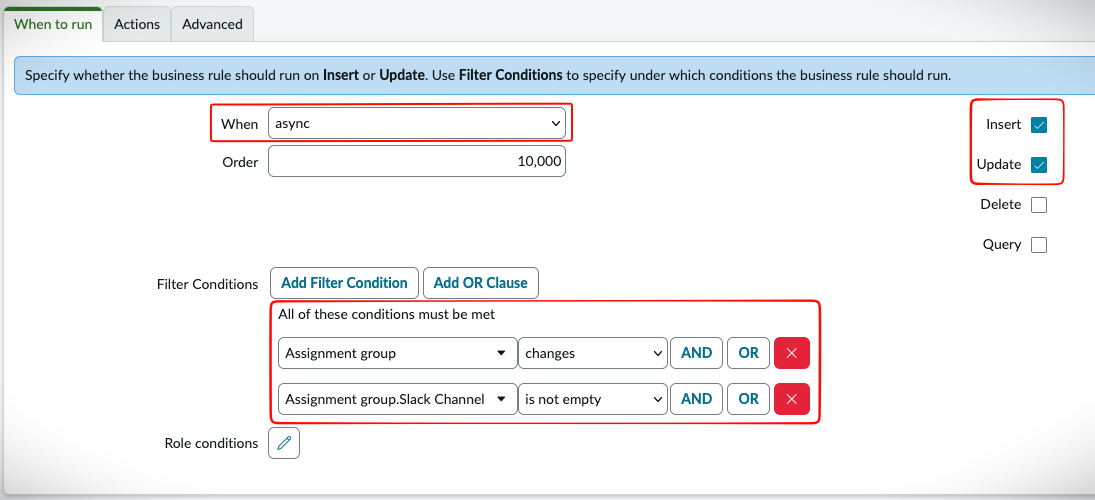
In the When to Run Tab you can see a few things.
- This is set to run in an Asynchronous fashion. This means the code will run in parallel, as opposed to running before or after the record is inserted.
- This rule will trigger when a record is Inserted or Updated
- The conditions behind it tell us what should trigger this.
The code for What we run is in the Advanced tab. Here you'll see the same code we have in our example above. Pay attention to this line: var slackChannel = current.assignment_group.u_slack_channel. If you remember above, we said that current is a pointer to a record. In our business rules, it points to whatever ticket triggered this. From there we then dot walk over to the slack channel of our assignment group. So current is the record, and then we want to access the value for the Assignment Group and the field we want from that table is u_slack_channel.
Rest Messages⚓︎
REST Messages are the core building block for making API calls to an external resource from ServiceNow. You can see the REST Message for our Slack API calls here.
If you look closely in our Script Include, we make references to this and add our URL and parameters with code like this:
// Now we need to build our API call
var r = new sn_ws.RESTMessageV2('Slack-API', 'Default POST');
// Set our Query Parameters
r.setQueryParameter('channel', slackTarget);
r.setQueryParameter('pretty', 1);
r.setQueryParameter('blocks', JSON.stringify(finalSlackBlock));
// Define our API endpoint
r.setStringParameterNoEscape('endpoint', 'https://slack.com/api/chat.postMessage')
Slack Resources⚓︎
- Slack Blocks
- Slack Block Kit Builder This will help you understand how Slack Blocks look. These Slack Blocks are at the core of our
sendTaskNotification.