Task Template
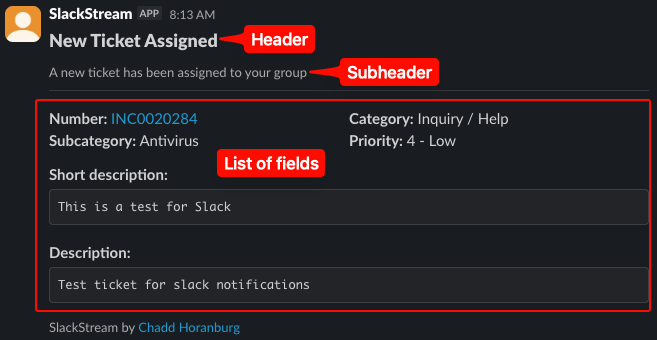
The simplest way to setup a slack notification is using the pre-defined template for tasks. This breaks things down into a few easy components:
- Header: This is the large title at the top of your slack notification
- Subheader: This is the smaller context text underneath your header. It supports markdown so you can include hyperlinks (for example, linking to a KB article).
- List of Fields: This is a list of fields you want included in your notification.
When you combine these things together, it makes a slack notification as easy as 5 lines of text. Consider this example where we notify a team if a new ticket is assigned to their group:
var slackChannel = current.assignment_group.u_slack_channel;
var header = "New Ticket Assigned";
var subheader = "A new ticket has been assigned to your group"
var fieldList = ["category","subcategory","priority","short_description","description"];
var response = new x_mmvau_slackstr_0.SlackStream().sendTaskNotification(current, header, subheader, slackChannel, fieldList);
The code above gives us a notification like this:
List of Fields⚓︎
The only real part of customizing this is the List of Fields. This list requires the actual field names (not the labels) of the fields you want included in your notification.
Info
We automatically include the Number, so you don't need to add it to your list of fields.
This means if you want to include the Short Description field, you 'll need to reference its proper name, which is short_description.